

Nmap (Network Mapper) is the industry-standard tool for network discovery, port scanning, and security auditing. Originally created by Gordon Lyon in 1997, it's now used by cybersecurity professionals, network administrators, and ethical hackers worldwide. If you can only learn one reconnaissance tool, make it Nmap.
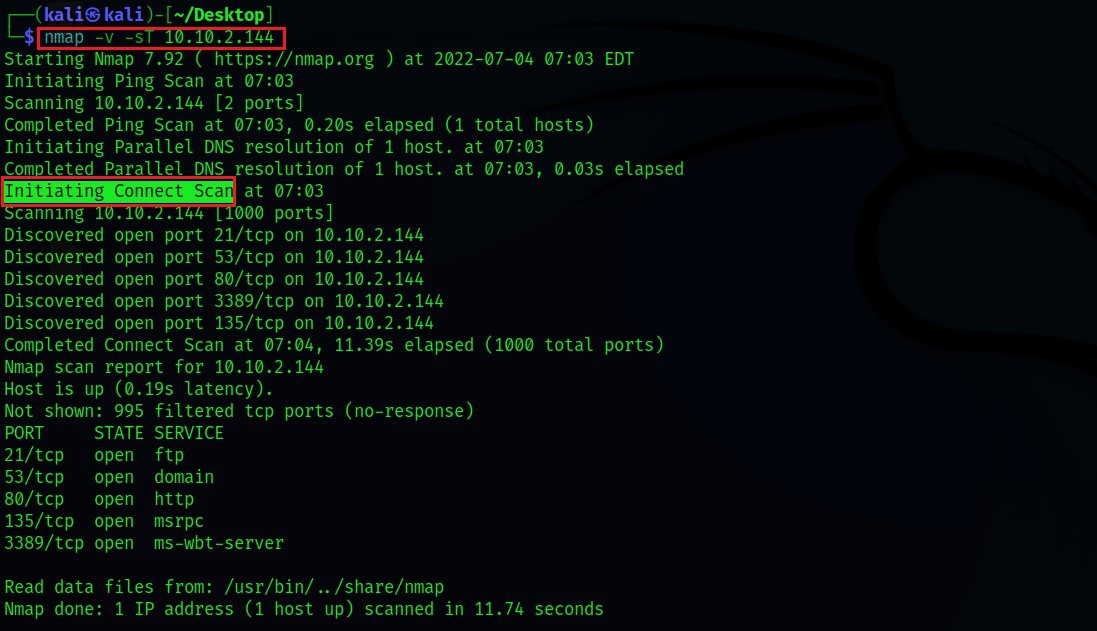
What Nmap does: It sends specially crafted packets to target hosts and analyzes the responses to determine what hosts are available, what services they run, what operating systems they use, and what security measures are in place.
Installation
- Kali Linux: pre-installed (just type 'nmap' in terminal)
- Ubuntu/Debian: sudo apt install nmap
- Windows: download installer fromnmap.org/download
- macOS: brew install nmap
Essential Scan Types
| Command | Scan Type | Description | Use Case |
|---|---|---|---|
| nmap -sS target | TCP SYN (Stealth) | Half-open scan; fast and less detectable | Default go-to scan |
| nmap -sT target | TCP Connect | Full three-way handshake; logged by target | When SYN scan isn't possible |
| nmap -sU target | UDP Scan | Checks open UDP ports (DNS, SNMP, DHCP) | Discovering UDP services |
| nmap -sV target | Service Version | Identifies service name and version on open ports | Vulnerability assessment |
| nmap -O target | OS Detection | Fingerprints the operating system of the target | Asset inventory |
| nmap -A target | Aggressive | Combines OS detect, version, script, traceroute | Comprehensive recon |
Practical Examples
- Scan a single host for the top 1000 ports: nmap 192.168.1.1
- Scan an entire subnet: nmap 192.168.1.0/24
- Scan specific ports: nmap -p 22,80,443,3389 192.168.1.1
- Fast scan (top 100 ports): nmap -F 192.168.1.1
- Scan all 65535 ports: nmap -p- 192.168.1.1
- Output to file: nmap -oN scan_results.txt 192.168.1.1
Nmap Scripting Engine (NSE)
NSE is what makes Nmap truly powerful. It has 600+ scripts that automate vulnerability checks, brute-force attacks, and service enumeration. Scripts are categorized as: auth, brute, discovery, exploit, fuzzer, intrusive, malware, safe, version, and vuln.
- Check for known vulnerabilities: nmap --script vuln 192.168.1.1
- Enumerate HTTP directories: nmap --script http-enum 192.168.1.1
- Check for SMB vulnerabilities (EternalBlue): nmap --script smb-vuln-ms17-010 192.168.1.1
- Brute-force SSH: nmap --script ssh-brute 192.168.1.1 (use only in authorized tests!)
Important: Legal & Ethical Usage
Nmap is a powerful tool, and using it against systems you don't own or have explicit written authorization to test is illegal under the IT Act, 2000 (India) and the Computer Fraud and Abuse Act (US). Always scan your own lab environments or systems where you have a signed penetration testing agreement.
At CCN, every student gets a dedicated virtual lab environment with 50+ target machines. You practice Nmap scans every day without any legal risk — and by the time you graduate, scanning is second nature.
Published by
Ashish Kumar Saini