Wireshark is the world's most widely used network protocol analyzer. It lets you capture and interactively browse the traffic running on a computer network in real time. Whether you're troubleshooting a network issue, analyzing a security incident, or learning how protocols work under the hood — Wireshark is the tool.
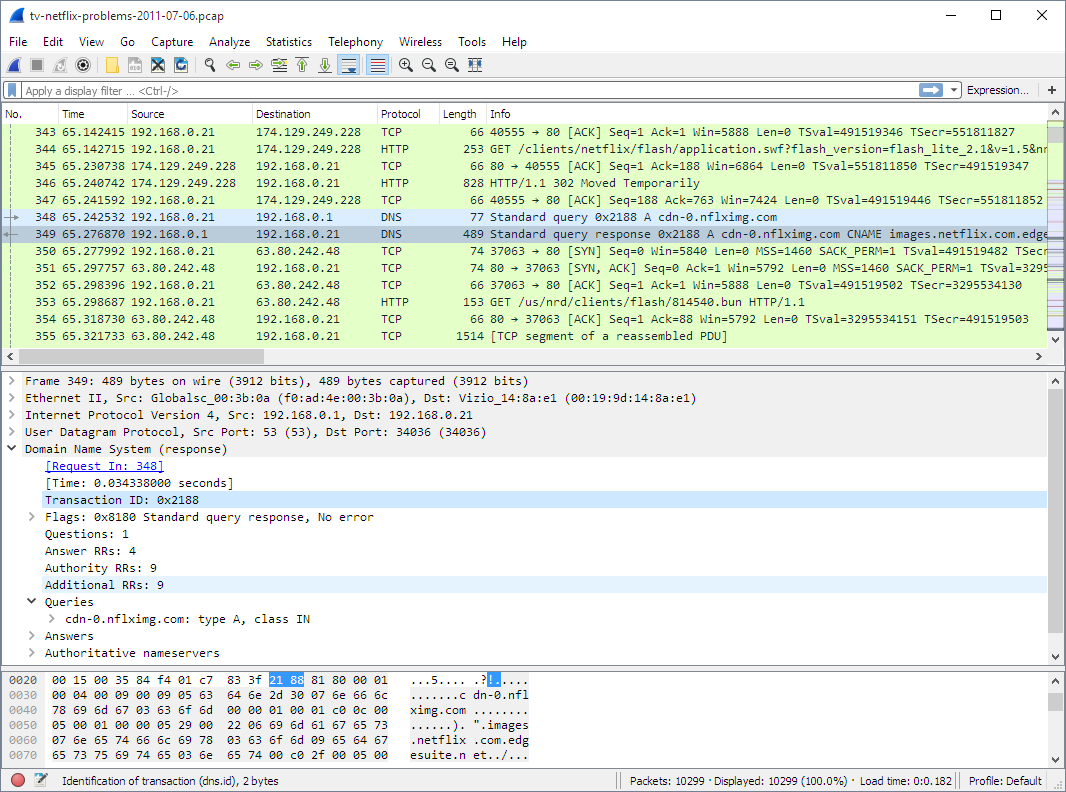
Why learn Wireshark? It's free, open-source, and used by every SOC analyst, network engineer, and penetration tester on the planet. It's mentioned in almost every cybersecurity job description.
Installing Wireshark
- Download from the official sitewireshark.org
- On Windows: run the installer and include Npcap (packet capture driver)
- On Linux: install via package manager — sudo apt install wireshark (Ubuntu/Debian)
- On macOS: brew install wireshark or download the .dmg from the website
Your First Packet Capture
- Open Wireshark and select your active network interface (usually 'Ethernet' or 'Wi-Fi')
- Click the blue shark fin icon to start capturing
- Open a browser and visit any website — you'll see packets flood the screen
- Click the red square to stop capturing
- You'll see columns: No., Time, Source, Destination, Protocol, Length, Info
Essential Display Filters
| Filter | What It Does | Example Use Case |
|---|---|---|
| http | Shows only HTTP traffic | Analyzing web requests |
| tcp.port == 443 | Shows HTTPS/TLS traffic | Checking encrypted connections |
| ip.addr == 192.168.1.1 | Shows traffic to/from a specific IP | Isolating a suspicious host |
| dns | Shows DNS queries and responses | Detecting DNS tunneling |
| tcp.flags.syn == 1 | Shows TCP SYN packets | Detecting port scans |
| frame contains "password" | Finds packets containing the word | Credential hunting (unencrypted) |
Beginner Exercises
- Capture a DNS resolution: visit a website and filter for 'dns' to see the query and response
- Follow a TCP Stream: right-click any packet → Follow → TCP Stream to see the full conversation
- Capture an HTTP login on a test site (DVWA) and extract the username/password from the POST request
- Detect an Nmap scan: run Nmap from a VM against another VM and identify the SYN scan pattern in Wireshark
- Export captured packets to a .pcap file for offline analysis
Wireshark is one of those tools where 20% of the features handle 80% of real-world use cases. Master the basics outlined above, and you'll be ahead of most junior analysts on day one.
Published by
Ashish Kumar Saini